 diri
diri- How to read the sidebar
- How to jump straight to the agent that needs you
- How to stop two agents editing the same files
1Start another agent
You do not have to wait. While one agent works, open New Agent again, or press ⌘T, and start the next. Mix agents freely: Claude Code on one task, Codex on another.
Research the five biggest competitors in our market and save a table of their pricing in competitors.md.
While that runs: draft a launch email for our existing customers in email.md.
2Read the sidebar
Every session is a row, and the row tells you what is happening without opening it:
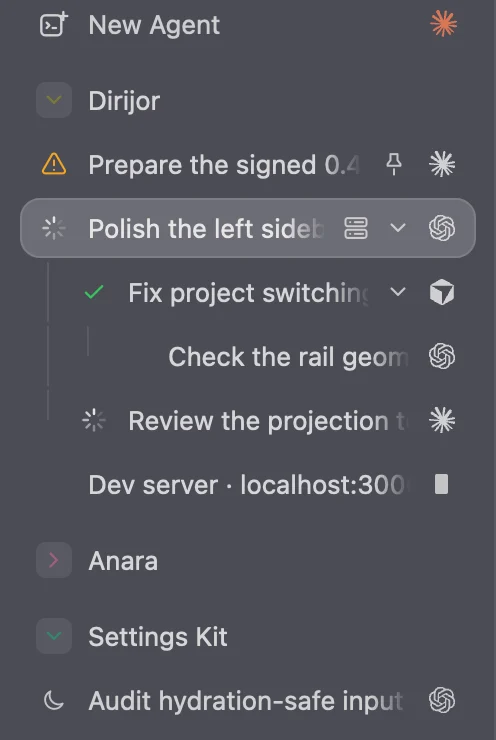
- Spinning
- Working. Leave it alone.
- Amber
- Needs you. It asked a question or wants permission.
- Green
- Done, and you have not looked yet.
- Grey
- Idle, or finished and already seen.
- Moon
- Hibernated to save memory. Click it to wake it.
3Jump to whoever needs you
- Press ⇧⌘J to go straight to the next session waiting on you.
- Press ⌘1 through ⌘9 to switch between sessions in sidebar order.
- The bell at the top right (⇧⌘I) collects every “needs you” and “finished” moment, and the Dock icon shows how many are unread.
4Keep agents out of each other’s way
Two agents in the same folder can edit the same file at the same time and overwrite each other. Two simple ways to avoid that:
- Give them different files. Say it in the task: “only edit pricing.md”, “only work inside the blog folder”.
- Give each its own copy. If the folder is a Git project, ask for it in the task. The agent makes its own copy of the project on a separate branch, called a worktree, and nothing it does touches the others until you merge it.
Use diri to do this in a new worktree so it does not touch my current files: rewrite the onboarding emails in the emails folder.
Worktrees separate files only. Agents still share the same accounts, the internet and anything running on your Mac.
5Bring it together
When the agents finish, read each result in its own session. If they worked in separate copies, review each one in the Review panel and merge them one at a time.
Or let an agent do the coordinating for you. That is the next guide: Let agents work as a team.