 diri
diri- How one agent can start and direct others
- What to ask for, with examples
- How to step in and keep the team on track
1How it works
Claude Code, Codex and Cursor sessions started in diri come with a set of team tools built in. With them, an agent can start other agents, hand them tasks, read what they write, answer their questions, and collect their results. There is nothing to set up.
You talk to one agent, the lead. The lead talks to its helpers.
2Ask for a team
Describe the goal, how to split it, and what “done” looks like. Start with “Use diri to…” so the agent reaches for its team tools instead of trying to do everything itself.
Use diri to start three agents. One researches our top five competitors’ pricing pages, one collects customer quotes from the interviews folder, and one drafts a positioning one-pager. Wait for all three, then combine their work into launch-brief.md and tell me what is still missing.
Use diri to split this release checklist across three agents: one writes the release notes, one checks every link in the docs, one tests the sign-up flow. Report back with a short status for each.
Use diri to refactor the settings module. Give each sub-task its own agent in a separate worktree, review their changes, and merge only the ones whose tests pass.
3Watch them work
Each helper appears in the sidebar as its own session, nested under the lead. Selecting a session highlights its lead and helpers so you can see who belongs to which team.
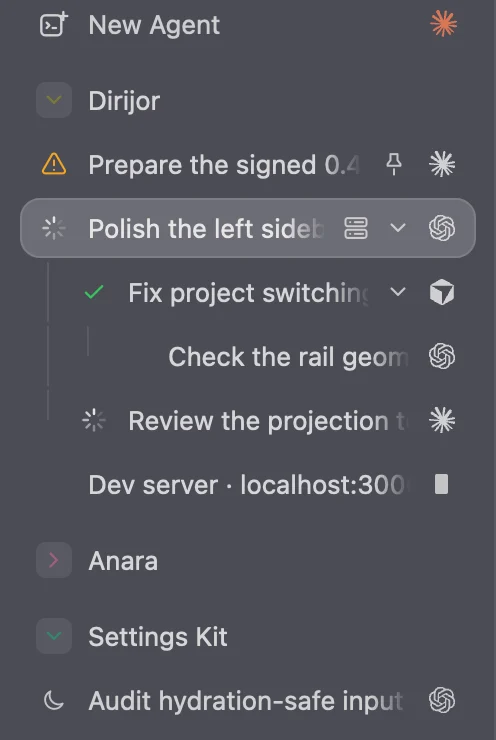
The lead waits for helpers to finish, reads their output, sends follow-ups, and answers their questions for you when it can. When something truly needs a human, the helper turns amber like any other session.
4Step in any time
Helpers are normal sessions. Click one to read exactly what it is doing, or type to it directly to correct course. You can also tell the lead:
Use diri to tell the agent working on quotes that the interviews folder is out of date. It should use interviews-2026 instead.
5Tips for good teams
- Split by output, not by step. “One agent per section of the report” works better than “one agent researches, then another writes”.
- Say where results go. A file name per helper avoids two agents writing the same file.
- Ask for a report. “Report back with one line per helper” gives you a quick summary to read.
- Keep it small at first. Two or three helpers is plenty. A lead can run up to 16 helpers, and helpers can start their own, up to three levels deep.
6Clean up
When the work is done, ask the lead to release its helpers, or archive them yourself: select several rows, right-click, and choose Archive. The files they made stay in your folder.